
Last updated: 2 August 2026.
A 1Win registration creates the profile used for login, identity checks, deposits, withdrawals and promotional eligibility. Nigerian users need an active phone number or email, accurate adult identity details, a secure password and the correct NGN currency setting. The form can be completed quickly, but each field should match information that can later be verified.
The instructions explain every sign-up method, the PROMOTIONBET field, SMS and email confirmation, one-click credential storage and the checks that prevent duplicate or mismatched accounts. They also show what to do when a code does not arrive and how the initial details affect future payment verification.
What You Need Before You Start
Nothing fancy:
- A working phone number or email — Use a contact you control and can keep for recovery and security codes.
- Age of 18 or older — Registration and betting are restricted to adults, and age may be verified.
- A few uninterrupted minutes — Check each contact and identity field before submitting the form.
You won’t need to upload your NIN or passport or anything right now. That verification stuff comes later when you want to withdraw money. For registration itself, it’s just your contact info and a password. Easy.
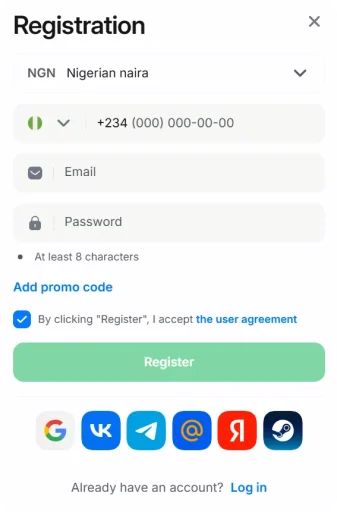
How to Register on 1Win
The 1Win sign-up sequence is:
First — Get to the Registration Page
Go to 1win-bets.ng on your phone or laptop. Already got the 1Win app? That works too — registration is identical either way.
Look for the “Registration” or “Sign Up” button. It’s green, sitting in the top right corner, big enough that you’d have to actively try to miss it.
Then — Pick Your Registration Method
They give you options for how to create your 1Win account:
- One-click — The system generates a username and password automatically. Save both details securely before closing the page, because they are required for the next sign-in.
- Phone number — You put in your Nigerian number, they send an SMS code to verify it’s really you
- Email — Standard registration with your email address. You’ll get a verification link to click
- Social accounts — Connect through Google, Telegram, whatever. Quick, but now your betting account is tied to your social profile, which some people don’t love
Most people go with phone or email. Personally, I lean toward email because it’s easier to recover the account later if something goes sideways. Phone numbers change, get stolen, whatever. Email is more stable. But both work fine.
Now — Fill In Your Details
Going with phone registration:
- Put in your Nigerian number — you can start with +234 or just 0, they’ll figure it out
- Create a password — use a unique combination that is not a simple sequence, birthday or password reused on another service.
- Select your currency — pick NGN for Nigerian Naira. Don’t accidentally choose USD or you’ll confuse yourself every time you check your balance
Going with email:
- Enter your email address — Gmail, Yahoo, Outlook, doesn’t matter
- Create a password — use the same password requirements
- Select NGN as your currency
Important Part — Enter the Promo Code
This is where people get stuck. Look for a field that says “Promo Code” or “Bonus Code.” Sometimes it’s right there visible. Sometimes it’s hidden behind a link that says “I have a promo code” — you gotta click that to reveal the field.
When you find it, type: PROMOTIONBET
All caps. No spaces. No extra characters. Just PROMOTIONBET.
This 1Win registration promo code activates the full welcome bonus — up to 500% on your first four deposits. Skip this part and you might miss out entirely because adding promo codes after registration is hit or miss. Some people manage it, some don’t. Don’t gamble on it (ironic, I know).
Almost Done — Tick the Box and Register
There’s a checkbox saying you’re 18+ and you accept the terms and conditions. Tick it. I know nobody reads terms and conditions. I don’t either. But you gotta tick the box to continue, so tick it.
Hit the “Register” button.
That’s it. Account created. Told you it was quick.
Last Thing — Verify Your Contact
If you registered with phone: Check your SMS. There’s a message with a 4-6 digit code. Punch it in where they’re asking. If it doesn’t arrive within a couple minutes, hit “Resend” — Nigerian networks can be slow sometimes, especially MTN during peak hours.
If you registered with email: Go check your inbox. Also check spam. Also check the “Promotions” tab if you’re on Gmail — verification emails love hiding in weird places. Find the email, click the verification link, done.
If you did one-click: No verification needed right now. But you’ll have to add proper contact details eventually, so don’t think you’ve escaped it forever.
You’re Registered — What Now?
Account exists. Let’s talk about what comes next.
Immediately: Save Your Login Details
I’m dead serious about this. Write them down. Take a screenshot. Put them in your notes app. Email them to yourself. Whatever works for you.
Especially if you used one-click registration where the system generated your password. I’ve had people message me — and I’m not exaggerating — three minutes after registering, asking how to recover their account because they already forgot the password. Don’t be that person. Please.
Next: Make Your First Deposit
Can’t bet on nothing. Head to the deposit section and add some funds to your account. Minimum is usually around ₦500 for most payment methods — bank transfer, debit cards, USSD codes, all that stuff.
When you make your first deposit, the welcome bonus kicks in automatically (assuming you entered PROMOTIONBET during registration). First deposit gets 200% match, going up to 500% total across four deposits.
At Some Point: Complete Your Profile
Before you can withdraw any money, you’ll need to fill in your profile properly — your full name as it appears on your ID, date of birth, possibly your address. This is for KYC verification purposes.
You don’t have to do this right now. You can deposit, bet, play casino, whatever — no rush. But when withdrawal time comes and your profile is incomplete, it causes delays. Just a heads up so you’re not caught off guard later.
Account Verification — The KYC Part
Registration and verification are two different things. People mix them up constantly, so let me make it clear.
Registration = Creating the account. Takes two minutes. Lets you deposit and play immediately.
Verification (KYC) = Proving your identity to 1Win. Required before withdrawing money, especially larger amounts.
Documents They’ll Want
When 1Win asks you to verify — and they will, at some point — verification can require:
- Government-issued ID — NIN slip, international passport, driver’s license, or voter’s card. Something that shows your name, your photo, and your date of birth
- Proof of address (sometimes) — A utility bill or bank statement with your name and address on it. Not always required but sometimes they ask
- Selfie with the ID, when requested — Hold the document beside the face in clear light so the verification team can compare the person with the ID photo.
When you take pictures of documents, make sure they’re clear. All four corners visible. No blur, no shadows covering important parts. Blurry photos get rejected and then you gotta do it again. Save yourself the hassle.
How Long Verification Takes
Usually 24-72 hours after you submit everything. Sometimes faster if they’re not swamped with requests. Sometimes slower during busy periods or if something in your documents needs a second look.
If they reject something, they’ll tell you why — “photo too blurry,” “name doesn’t match what you registered with,” that kind of thing. Fix whatever’s wrong and resubmit.
Common Problems and How to Fix Them
“Account Already Exists” Message
This means you’ve registered before using that phone number or email. Maybe you forgot. Maybe you tried signing up months ago and abandoned it. Either way, you’ve got an existing account.
The fix: Don’t try to create another account. Go to the login page, use “Forgot Password” to reset your credentials, and get back into your existing account. Creating duplicate accounts causes bigger problems down the line — all your accounts can get blocked.
SMS Code Isn’t Arriving
Happens sometimes. Few things to check:
- Did you type the phone number correctly? With the right country code?
- Is your phone blocking messages from unknown senders? Some phones have aggressive spam filters
- Network might just be slow — give it 2-3 minutes before panicking
- Try hitting “Resend Code” if that option exists
If you’ve tried multiple times and SMS just won’t come through, switch to email registration instead. Life’s too short to fight with network providers.
Email Verification Not Coming
- Check your spam folder. Seriously, check it. Verification emails from betting sites end up in spam like 70% of the time
- If you’re on Gmail, check the “Promotions” tab too
- Make sure you didn’t have a typo in your email address
- Try using a different email if nothing works
Can’t Find the Promo Code Field
It’s there, just sometimes hidden. Look for text that says “I have a promo code” or “Add promotional code” — clicking that should reveal the input field. Different registration methods put it in slightly different places.
If you accidentally completed registration without entering PROMOTIONBET, you can try adding it in your account settings under promotions, or contact support and ask nicely. Sometimes they can apply it retroactively. Sometimes they can’t. Depends on their policy at the time and how they’re feeling,.
Registering on Phone vs Computer
1Win app registration follows the exact same process as website registration. Same fields, same options, same promo code. The screen just looks a bit different because it’s formatted for mobile.
If you’re registering on the mobile website (not the app), same deal. Process is identical.
Don’t have the app yet? Download the 1Win app here. Or just register on the website first and download the app later. Your account works everywhere — one login for website, mobile site, and app.
Can I Make More Than One Account?
No. Hard no. 1Win allows one account per person.
If you’re thinking “I’ll make a second account and get the welcome bonus again” — don’t. They track IP addresses, device fingerprints, payment methods. When they catch duplicate accounts — and they usually do — all connected accounts get blocked. Whatever money you had in there? Gone.
If you have a legitimate reason for needing a fresh account — maybe your old one was hacked, you lost access entirely, something like that — contact support directly and explain. They might help. But secretly creating duplicates behind their back? That’s just asking for trouble.
The Registration Bonus Breakdown
When you use promo code PROMOTIONBET during registration, you qualify for the welcome bonus package:
- First deposit: 200% bonus
- Second deposit: 150% bonus
- Third deposit: 100% bonus
- Fourth deposit: 50% bonus
Add those up and yeah, it’s 500% total across four deposits. There’s a maximum cap on the bonus amount — usually around ₦500,000 — and wagering requirements before you can withdraw it. Check the full bonus guide for the nitty-gritty on how wagering works.
As for 1Win sign up bonus without depositing anything… those are rare. No deposit bonuses occasionally pop up as special promotions, but they’re small and come with heavy wagering attached. Don’t count on getting free money just for registering — that’s not how this works.
FAQ
How do I register on 1Win in Nigeria?
Go to 1win-bets.ng, click Register, enter your phone or email, create a password, type in promo code PROMOTIONBET, click Register, verify your contact. The whole thing takes about two minutes.
What’s the 1Win promo code for registration?
PROMOTIONBET — enter this during registration to activate the 500% welcome bonus across your first four deposits.
How long does registration take?
About two minutes for the account itself. Verification for withdrawals is separate and takes 24-72 hours after you submit documents.
Do I need to show ID to register?
Not during registration, no. You only need phone or email. ID verification happens later when you want to withdraw money.
Does my Nigerian phone number work?
Yes. Nigerian numbers work perfectly. You’ll receive an SMS with a verification code.
Why isn’t the SMS code coming through?
Double-check the phone number is correct, wait a few minutes for network delays, try resending. If it still won’t work, switch to email registration instead.
Can I have more than one account?
No. One account per person. If you create duplicates, all accounts get blocked and you lose your money.
What’s the sign up bonus?
With code PROMOTIONBET, up to 500% bonus spread across your first four deposits. No deposit bonuses are rare and typically small.
Registration Decision Checklist
That’s the whole 1Win registration process. Two minutes, promo code PROMOTIONBET, verify your contact, done. Not complicated once where everything is.
After you’re set up, make your first deposit to activate the welcome bonus and start playing. Or poke around first — check out sports betting, casino games, Aviator, see what catches your interest.
Already have an account? Log in here.
One last thing — only bet what you can afford to lose. This is entertainment, not a retirement plan. You’ve heard it before, I know. But it’s worth repeating.
About the Author

Adebayo “Dayo” Adeyemi runs content at 1win-bets.ng. Used to play football semi-professionally in Ibadan until an ACL tear in 2015 ended that dream. Been writing about betting in Nigeria since 2017 — started at Tribune, moved to BetNaija, now here.
Dayo uses the platforms he writes about. Deposits his own money, bets, withdraws. If a site doesn’t pay out, you’ll hear about it. When he’s not working, he’s probably watching Chelsea bottle another season and pretending he expected it.
Find him: Twitter · Telegram · More Articles
Choosing Registration Details That Will Pass Verification
The information entered at sign-up becomes the reference point for later identity and payment checks. Use the legal name and date of birth shown on the identification document you would present if verification is requested. A nickname, shortened surname or guessed birth date may seem harmless during registration but can block a withdrawal when the profile no longer matches the document.
Enter a phone number and email address that you control for the long term. They may be used for one-time codes, recovery notices and security alerts. Before submitting the form, check the country code, spelling and every digit. Correcting a contact immediately is simpler than proving ownership after access to it has been lost.
One Profile, One Consistent Payment Identity
Keep a single account and connect payment methods in the same identity. Opening another profile because a password was forgotten or a promotional code was missed can create duplicate-account checks. Recover the existing profile instead, and contact support if a registration attempt appears to have created an incomplete account.
The name on a bank account, card or wallet should correspond with the registered player. Third-party payments can create questions about ownership and may delay a transaction while the source of funds is reviewed. The deposit instructions explain how to confirm the method and reference before sending money.
Before Accepting a Promotion at Sign-Up
A registration offer can affect the way the first deposit is credited. Read the minimum deposit, qualifying payment methods, wagering requirement, eligible products, maximum stake, expiry period and withdrawal conditions before opting in. If the plan is to withdraw without completing promotional play, choosing no offer may be the clearer option.
Save the displayed terms at the time of activation. Promotions can differ by campaign, and the conditions attached to the accepted offer are the ones that matter. The detailed bonus guide explains how wagering balance, cash balance and progress indicators interact after registration.
Registration on a Shared or Public Device
A personal device is preferable because the form contains contact and identity details. If a shared device must be used, disable password saving, avoid storing card data, sign out after the session and clear only the site data related to the account. Do not leave screenshots of generated credentials in a public gallery or messaging draft.
Public Wi-Fi can be unstable and may interrupt one-time-code delivery or form submission. If the connection drops after pressing the final button, check whether the account already exists before repeating the process. This prevents accidental duplicate attempts with the same contact details.
Post-Registration Account Setup
- Confirm the registered phone number and email while both are accessible.
- Create a unique password and store it securely.
- Set the account currency correctly before the first transaction.
- Review responsible-play limits and choose a deposit budget.
- Check whether a promotion was activated and note its expiry time.
- Complete requested profile fields with document-matching information.
After these checks, test the login once before funding the balance. A successful sign-in confirms that the identifier and recovery channel work. If access fails, use the login recovery steps rather than opening a second profile.
Common Data Mismatches and Their Consequences
A missing middle name is not always treated the same way as a different surname, and a formatting difference is not necessarily the same as a false date of birth. Support may ask for clarification when the account, document and payment record do not align. Provide accurate information and follow the correction process shown in the account; do not edit unrelated fields in an attempt to force a match.
Registration is complete only when the account can be accessed and its core details are accurate. Taking a few minutes to verify them at the start reduces recovery, payment and identity problems later.
Currency and Country Settings Before Submission
Select NGN when the account will be funded and withdrawn in Nigerian naira. A different currency can change how amounts and conversion are displayed, and it may not be editable after registration. Confirm the country and time-zone information as well because they affect available methods and event times. After the profile opens, the mobile setup instructions can be used on the same credentials; no separate app registration is needed.